
Ebda Chat — sell and support your customers on WhatsApp
Confirm orders and send campaigns to your customers on WhatsApp, all in one place, linked to Ebda Store. Works with the WhatsApp Business Platform.
What's inside
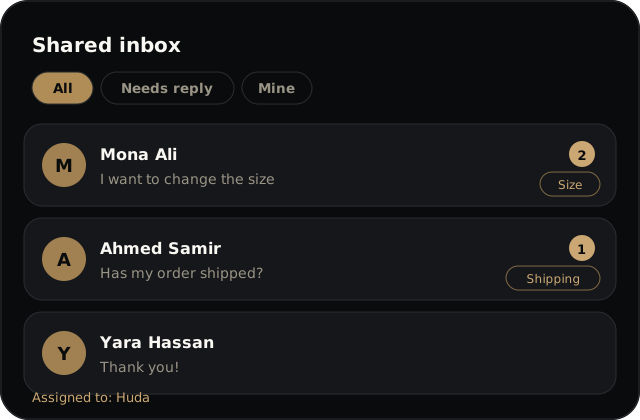
Shared inbox
Every customer conversation on one screen. Assign a conversation to a teammate, add tags and private notes, and search the messages.
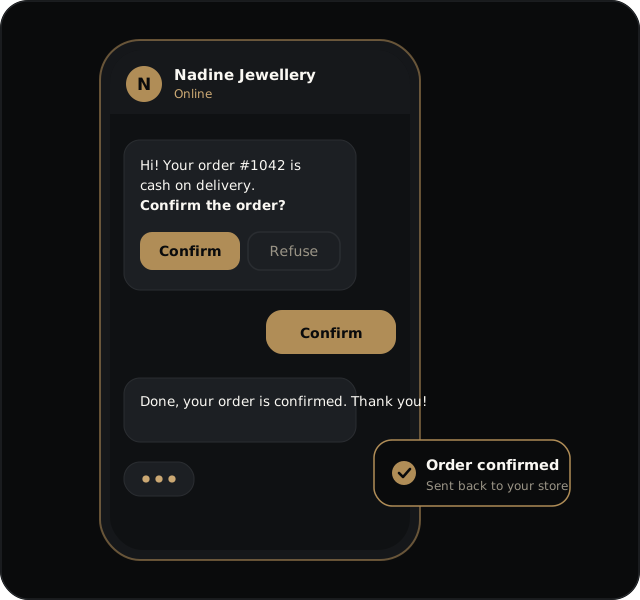
Order and cash-on-delivery confirmations
When a customer places a cash-on-delivery order, they get a WhatsApp message with two buttons: confirm the order or refuse it. The result goes back to your store, and order confirmations and shipping updates are sent from Ebda Store data. If the customer does not answer within 24 hours, it is recorded as "no reply".
Order inside the chat
A customer picks products from the catalog on WhatsApp, sends the cart, and pays with InstaPay. The order stays "awaiting payment" until your store confirms the money arrived.
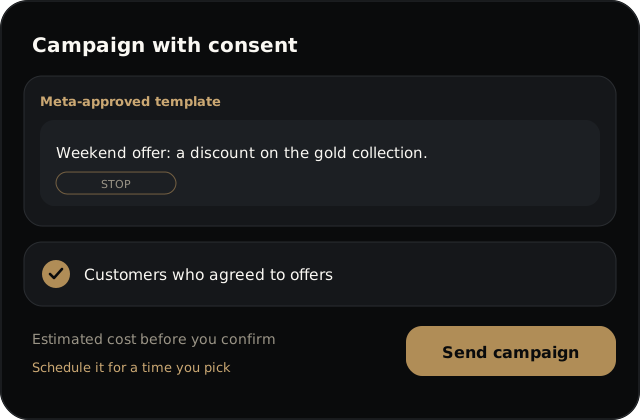
Templates and campaigns with consent
Send a Meta-approved template to a segment of your customers, see the estimated cost before you confirm, and schedule the send. It goes only to customers who agreed to marketing; anyone who opted out, or has no consent on record, is removed automatically.
An AI agent that answers in Egyptian Arabic
It answers from the store knowledge you write, searches the catalog, reports order status, and hands the conversation to your team when the customer asks for a person. It replies only inside the 24-hour window, and every reply uses AI credits.
Service menu, hours and location
Add a menu of your common questions (up to 8), an automatic reply while you are closed, and your store location on a tap.
Linked to Ebda Store
The link is built in, with no setup on your side. Ebda Store keeps owning orders, prices and stock; Ebda Chat talks to the customer using that data.
- Order confirmations and shipping updates reach the customer on WhatsApp.
- The cash-on-delivery result (confirmed, refused, no reply) goes back to your store.
- The catalog and the orders placed in the chat come from your store, so you never type them twice.
Your own number or the shared number
Connect your own business number, or start quickly on the shared number. If you already use the WhatsApp Business app on that number, you can keep using it next to Ebda Chat without losing anything.
| Item | Your own number | Shared number |
|---|---|---|
| What customers see | Your business name and number | The platform's number; the customer picks your store from a list |
| Setup | Connect through Meta's official flow | Join from the app |
| Marketing campaigns | Yes | No |
| Who pays Meta | Meta bills your own card directly | The wallet, at Meta’s price |
A package that fits your work.
Pick the package that fits your team and the number of AI replies you need.
Included
For Ebda Store merchants
Included with Ebda Store Business
- 2 team members
- Shared inbox
- Order and cash-on-delivery confirmations
- Message templates
- 100 AI replies a month
Starter
For a first team
EGP 690EGP 6,210 a month a year
- 2 team members
- Shared inbox
- Order and cash-on-delivery confirmations
- Message templates
- 300 AI replies a month
Growth
Campaigns and ordering in the chat
EGP 1,490EGP 13,410 a month a year
- 5 team members
- Shared inbox
- Order and cash-on-delivery confirmations
- Message templates
- Opt-in campaigns
- Ordering inside the chat
- 1,500 AI replies a month
Professional
Integrations and priority support
EGP 3,490EGP 31,410 a month a year
- 15 team members
- Shared inbox
- Order and cash-on-delivery confirmations
- Message templates
- Opt-in campaigns
- Ordering inside the chat
- Integrations and API
- Priority support
- 5,000 AI replies a month
Save 25% when you pay yearly.
Meta's fees
Meta charges per message by category (marketing, utility, authentication, service). On your own number, Meta bills your card directly. On the shared number the charge comes out of a prepaid EGP wallet you top up, at Meta's price.
One account
You sign in to Ebda Chat with the same Ebda AI Studio account you use for Ebda Store, with no second account and no second password.
Questions
Do I need a new number?
No. You can connect your current number (your Meta business account should preferably be verified), or start on the shared number with no verification and no connection.
Who pays Meta's fees?
On your own number, Meta bills your card directly. On the shared number, the wallet pays at Meta's price, with no margin from us at the moment.
Can I message anyone?
Marketing goes only to customers who agreed to it, using a Meta-approved template. Anyone who sends STOP is removed from campaigns. A free-text reply to a customer is allowed within 24 hours of their last message.
Is Ebda Chat part of WhatsApp?
No. Ebda Chat is a product of Ebda AI Studio, built on Meta's official WhatsApp Business Platform.
When does the AI agent answer?
Only inside the 24-hour window. When AI credits run out, the customer asks for a person, or the agent cannot answer, it hands the conversation to your team.
Ready to talk to your customers on WhatsApp?
Sign up with your Ebda AI Studio account and start.
Start now (opens in a new tab)
See the setup guides in the help centre (opens in a new tab) · Features